
Managing teams out in the field can be chaotic. For years, it's been a mix of spreadsheets, paper forms, and a constant stream of phone calls just to keep things moving. Field workforce management software cuts through that noise. It's a digital command centre for your entire field operation.
It gives managers a single, clear view to coordinate people, tasks, and equipment across multiple construction sites or manufacturing plants. No more guesswork.
What Is Field Workforce Management Software
Imagine an air traffic controller trying to direct planes with handwritten notes and a landline. It would be a disaster. They use a centralised, real-time system to see every aircraft, manage schedules, and prevent problems before they happen. That's exactly what field workforce management software does for your mobile workforce; it brings all the moving parts of your operation into one organised, visible system.
This is especially critical for Australian industries like construction and manufacturing. Managers are constantly juggling compliance with the Work Health and safety (WHS) Act, overseeing a roster of subcontractors, and making sure projects don't fall behind schedule. Without a proper system, information gets lost, mistakes happen, and risks multiply.
The Problem With Old Methods
For a long time, field operations ran on manual processes. Schedulers used whiteboards, supervisors carried clipboards, and workers filled out paper dockets at the end of a long day. While it might feel familiar, this approach creates major bottlenecks and dangerous blind spots.
- Delayed Information: A paper form detailing a potential site hazard has to be physically driven back to the office. This means managers don’t find out about a critical risk until hours or even days later.
- Compliance Nightmares: How do you prove that safety checks were actually completed? Or that a subcontractor has the right certifications? When your records are buried in filing cabinets, you’re always on the back foot during an audit.
- Inefficient Scheduling: Trying to manually assign tasks makes it nearly impossible to account for worker qualifications, travel time, or last-minute job changes. The result is wasted time, over-stretched teams, and a lot of frustration.
Simply put, the old way of working just can't keep up with the modern demands for accountability and efficiency.
To put it into perspective, here’s a quick look at how things change when you move from manual methods to a purpose-built software solution.
Table: Old Methods vs Modern Software
| Task | The Old Way (Paper and Spreadsheets) | The New Way (Field Workforce Management Software) |
|---|---|---|
| Scheduling & Dispatch | Manual updates on a whiteboard or spreadsheet. Constant phone calls to communicate changes. | Drag-and-drop scheduling with real-time updates sent directly to workers' phones. |
| Safety & Compliance | Paper forms and checklists stored in filing cabinets. Hard to track and verify completion. | Digital forms with photo evidence and time stamps. Instant access to compliance records for audits. |
| Job Progress Updates | Waiting for workers to return to the office or call in with updates. Information is always delayed. | Real-time GPS tracking and job status updates from the field. Full visibility for office staff. |
| Subcontractor Vetting | Chasing documents via email. Manually tracking expiry dates for licences and insurances. | Automated collection and verification of subcontractor credentials. Alerts for expiring documents. |
The difference isn't just about going digital; it's about gaining control and foresight over your entire operation.
Why A Digital Solution Is Now Essential
A modern software platform tackles these problems head-on. It creates a live connection between the office and the field, giving both Health and Safety Managers and Operations Managers the tools they need to stop reacting to problems and start preventing them.
The need for better systems has become urgent due to intense industry pressures. In Australia, the construction sector is wrestling with strict health and safety regulations that demand bulletproof oversight. This is compounded by a stark reality: Australia faces a projected shortfall of nearly 250,000 skilled workers by 2025, putting immense strain on existing teams.
This skills gap has had real-world consequences. Western Australia's construction sector reported a 47% increase in workplace incidents between 2020 and 2024, with fatigue and poor scheduling being flagged in 62% of those cases. You can dig deeper into the data on the Australian workforce management market.
A digital command centre isn’t just about making things easier. It’s about having the right information, right now, to make critical decisions that protect your workers and your business.
At the end of the day, field workforce management software is the practical answer to the growing complexity of managing a mobile team. It provides the structure you need to handle compliance, the visibility to manage risk, and the efficiency to drive your operations forward.
Core Features That Actually Get The Job Done
It’s easy to get lost in a long list of software features. What really matters is what these tools actually do for you and your team on the ground. Good field workforce management software isn't about adding another layer of complexity; it's about giving you practical tools to solve the daily headaches you face in construction, manufacturing, and other field-based industries.
We need to get past the buzzwords and look at how these features function in the real world.
The diagram below shows how these core features work together, connecting the three pillars of any field operation: your people, their tasks, and the equipment they use.
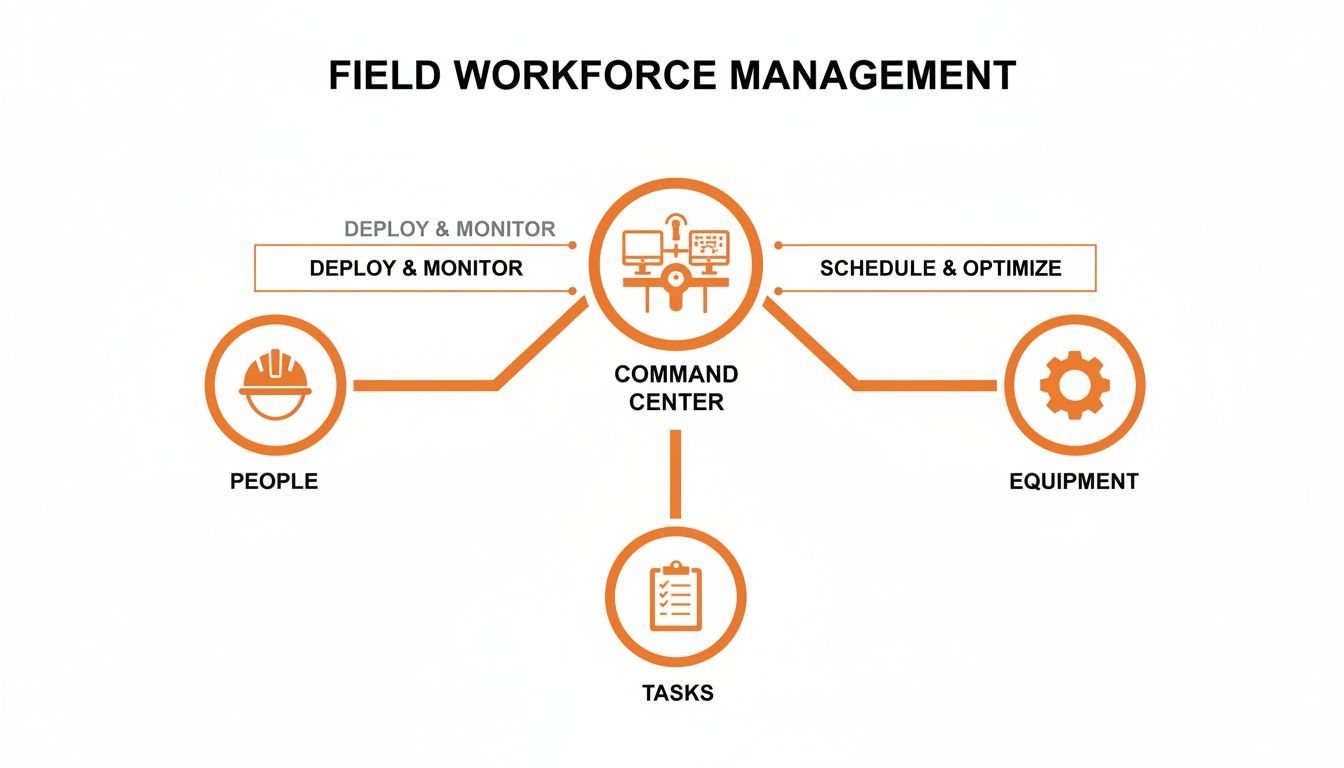
It’s clear that a central command system is essential for keeping every moving part of your operation coordinated and running smoothly.
Intelligent Scheduling And Dispatch
Let's face it: poor scheduling is a direct line to project delays and worker fatigue. A simple spreadsheet can't tell you if a worker has the right qualification for a high-risk job or if you're about to push them into overtime for the third day straight.
This is where modern scheduling tools step in. You can build schedules based on specific skills, certifications, and real-time availability. For instance, a construction site manager can instantly filter for all personnel with a valid 'Working at Heights' ticket and assign them to a task, knowing compliance is covered. The system flags potential problems, like assigning an uncertified worker, before it becomes an issue on site.
Digital Forms And Checklists
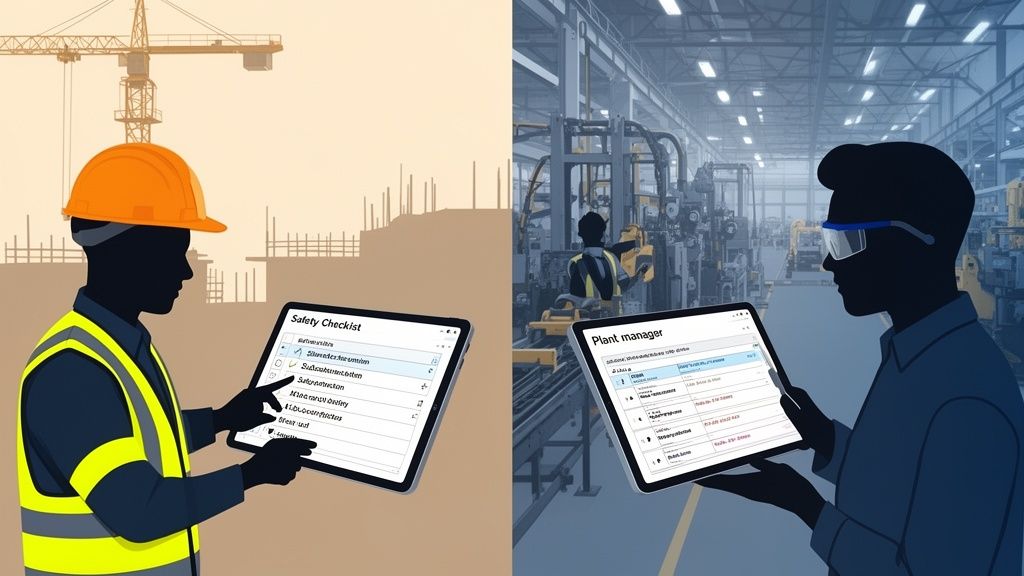
Paperwork is slow, gets lost, and creates a critical information lag. Digital forms on a mobile device fix this instantly. Think about a pre-start machinery check on the factory floor. Instead of a supervisor ticking off a paper checklist that gets filed away days later, the operator completes the digital form on a tablet right then and there.
They can even snap a photo of a worn-out part and attach it directly to the form. The moment they hit 'submit', the Plant Manager gets an alert, and a maintenance job can be created immediately. This creates an instant, auditable trail that proves the check was done, who did it, and when. Should an incident occur, this kind of verifiable data is priceless, a topic we cover in our guide to incident management software.
The goal is to turn compliance from a paperwork exercise into an active, real-time process. You get the information you need, right when you need it, to make smart decisions.
Real-Time Monitoring And Visibility
Knowing what's actually happening across multiple sites is a massive challenge for any operations manager. Real-time monitoring provides that crucial bird's-eye view of your entire operation. This isn't about micromanaging; it’s about having the visibility to offer support and spot trouble early.
Imagine a crew working on a remote construction project. With GPS tracking and status updates, an Operations Manager back at head office can see the team has been stationary for an unusually long time. A quick call reveals their equipment has broken down. Now, the manager can dispatch a repair team immediately instead of finding out about the delay at the end of the day.
Subcontractor Oversight Tools
Managing subcontractors adds another layer of complexity and risk. You're ultimately responsible for their compliance, but manually tracking their certifications, insurances, and site inductions is a nightmare.
A dedicated subcontractor portal automates this entire process. Subcontractors can upload their own documents, and the system automatically tracks expiry dates, sending alerts to both you and them when a renewal is due. This makes sure every single person on your site, employee or contractor, meets your safety and compliance standards without you having to chase them for paperwork.
AI-Assisted Workflows
So many of our daily administrative tasks are repetitive but essential. This is where advanced workflow automation software comes in, helping to cut down the manual grind.
AI-assisted workflows can pre-fill routine forms, suggest corrective actions based on inspection findings, or even analyse site data to flag potential hazards before they escalate. For a Health and Safety Manager, this means less time buried in data entry and more time focused on proactive risk management. It simply makes the whole process of documenting and reporting faster and far more accurate.
How Construction And Manufacturing Teams Use This Software
Theory is one thing, but seeing how field workforce management software solves real-world problems is where the rubber really meets the road. For managers in high-pressure industries like construction and manufacturing, the daily grind is a constant battle against delays, risks, and paperwork.
Let's look at how people in these exact roles are using this software to finally get a grip on their operations, manage risk effectively, and keep their projects moving forward.
On The Construction Site
Picture this: you're a site supervisor on a large residential build, trying to coordinate five different subcontractors on a single project. The pressure to hit your deadlines is massive, but so is the absolute necessity of keeping everyone safe.
With field workforce management software on your tablet, your day starts with a clear picture of who is scheduled to be on-site. You can instantly check that the plumbing subcontractor’s team has done their site induction and that their public liability insurance is actually up to date, all right there in the app. No more digging through filing cabinets in a dusty site office.
Later, a new excavator arrives. Instead of fumbling for a crumpled paper checklist, you pull out your tablet and run through a digital pre-start inspection form. You snap photos of the machine's condition, log the operator's credentials, and get their digital sign-off on the spot. That entire record is instantly filed and available to head office, creating a perfect, unbreakable audit trail. This is also a smarter way to manage your assets, and many construction teams find it useful to first learn how to perform an asset audit to get the most out of their gear.
This digital approach gives a site supervisor immediate command over compliance and progress. Problems are spotted and documented in real-time, not discovered in a pile of paperwork at the end of the week.
Across The Manufacturing Plant
Now, let's switch gears to a Plant Manager overseeing several production facilities. Her world revolves around machinery uptime, worker safety, and operational efficiency. Trying to manage maintenance crews across different locations with spreadsheets and frantic phone calls is just asking for missed services and expensive breakdowns.
This Plant Manager uses the software to schedule all preventative maintenance tasks months ahead of time. The system automatically assigns jobs to qualified technicians based on their location and specific skills. When a tech completes a machinery check, they use a digital form to record vital data like pressure readings and lubrication levels.
If a machine starts showing signs of a potential fault, the technician can raise a work order right there from their mobile device, attaching photos and notes. This instantly alerts the manager, who can then reshuffle priorities to tackle the urgent issue, preventing a catastrophic shutdown that would grind production to a halt. The software even helps her monitor worker hours, flagging when someone is nearing overtime to prevent fatigue-related mistakes. We cover more on this proactive approach in our guide to construction safety software.
A Practical Tool For Australian Businesses
Across Australia, adopting these digital tools isn't just a "nice-to-have" anymore; it's become essential for staying compliant and competitive. Cloud-based systems now command a huge 63.81% of the revenue share, mostly because they're flexible enough to handle the sheer scale of operations across the country.
Government mandates like Single Touch Payroll (STP) have spurred a 30% jump in adoption among construction firms because the software makes compliance effortless. In Western Australia, where construction output soared to AUD 45 billion in 2024, a solid 55% of firms now rely on these systems for subcontractor accountability, slashing audit failures by a third.
The Key Benefits For Your Business And Your Managers
Bringing new software into the business can feel like a huge step, but the right platform delivers real, practical results you can actually see and measure. For Health and Safety (H&S) Managers and Operations Managers, going digital isn't just about making things more convenient. It’s about gaining a real edge in how you handle risk, save time, and stay prepared for audits.
This isn’t about vague promises of a "better workplace." It’s about solid outcomes that shift your job from chasing paperwork to proactively managing your sites and teams.
Reduce Your Operational Risk
The single biggest win from a real-time system is the ability to spot a hazard before it turns into an incident. When a worker on-site flags a risk using a digital form on their phone, that critical information lands on your desk instantly. You're no longer waiting for a crumpled piece of paper to find its way back to the office hours or even days later.
This immediacy means you can act fast. If a pre-start check fails on a piece of machinery, you can pull it from service on the spot, preventing a potential accident. If a site inspection flags an unsafe area, you can have it cordoned off and send a notification to every worker on-site within minutes. This proactive approach is a complete game-changer for risk management.
Huge Time Savings for Managers and Teams
Just think about the hours your team currently burns on manual admin. A site supervisor might lose an hour or more every single day just collecting, sorting, and filing paper checklists. An operations manager could easily blow half a day wrestling with a spreadsheet, trying to build a schedule that balances everyone's qualifications and availability.
With field workforce management software, these frustrating tasks simply disappear.
- Reporting: Instead of manually crunching numbers from dozens of paper forms for a monthly report, the system builds it for you with a few clicks.
- Scheduling: What used to take hours of phone calls and spreadsheet gymnastics can now be sorted in minutes with a simple drag-and-drop tool.
- Finding Information: Locating a specific safety form from six months ago becomes a quick keyword search, not an entire afternoon digging through dusty filing cabinets.
This gives your managers and supervisors their most valuable resource back: their time.
Always Be Ready For An Audit
Audits are just a fact of life in construction and manufacturing. With a paper-based system, getting ready for one is a stressful, all-hands-on-deck scramble to find the right documents and prove you’ve been compliant. A digital, centralised system means you are ready for an audit, every single day.
When an auditor asks for proof of machinery inspections for a specific three-month period, you can pull up those records instantly. If they need to see the qualifications for every subcontractor on a project, all of that information is organised and right there.
A robust digital system turns an audit from a major headache into a simple, straightforward process. You can confidently pull up any required document in minutes, not days.
This level of organisation isn't just about peace of mind; it directly protects your bottom line by helping you avoid hefty non-compliance fines. Australia's booming construction sector is under increasing scrutiny, and a solid digital trail is your best defence. The software segment of this market is projected to command a 51.8% share by 2025, driven by complex local rules like Western Australia's Work Health and Safety Regulations 2022. In one year, Southern Australian construction firms saw a 29% jump in safety violations from manual scheduling errors alone, leading to a staggering AUD 150 million in penalties, exactly the kind of issue these systems are built to prevent. You can find more details on these workforce management market insights.
Choosing and Implementing the Right Software
Picking the right field workforce management software isn't just about ticking off a feature list. It's about finding a practical tool that actually fits how your team works on the ground, without adding a bunch of new headaches. And once you've found it, rolling it out properly is just as critical to make sure people use it and you see real results.
This whole process doesn't need to be a massive ordeal. If you focus on a few key areas when you're choosing the software and then follow a clear roadmap to get it running, the transition can be surprisingly smooth for everyone, from the office right through to the crew on site.
What to Look for in a Solution
Before you even think about booking a demo, you need to be crystal clear on what actually matters. A flashy interface is useless if the software can't handle the messy reality of your worksites. The goal here is to find a system that makes life easier, not one that forces your people to completely change how they do their jobs.
Here are the non-negotiables to keep on your radar:
- Customisation Options: Your workflows are unique to your business. The software needs to bend to your processes, not the other way around. Can you build your own digital forms and checklists that look and feel just like your old paper ones?
- Simple Integration: Any new system has to play nice with the tools you're already using. Check if it can plug into your existing payroll, accounting, or project management software. You want to avoid the frustrating task of entering the same data in two different places.
- Solid Data Security: You'll be handling sensitive info about your workers, projects, and clients. You need to be sure the provider has robust security measures in place to protect that data, especially if it’s all sitting in the cloud.
- Reliable Support: What happens when things inevitably go wrong? Look past the slick sales pitch and ask hard questions about their support. You need a partner who'll be there to help you fix problems quickly, not a company that ghosts you the minute the contract is signed.
Creating Your Implementation Roadmap
Once you’ve made your choice, a staged rollout is always the smartest play. Just dropping a new system on everyone at once is a surefire recipe for confusion and backlash. A more gradual approach lets you iron out any kinks and builds buy-in and confidence with your team.
Here’s a straightforward, four-step plan that works:
- Get Key People On Board: Start with your site supervisors and team leaders. These are the people who live and breathe the daily challenges, and their feedback is invaluable. If you get their buy-in early, they’ll become champions for the new system when it’s time to train everyone else.
- Run a Pilot Program: Don’t try to go all-in from day one. Pick a small, tech-savvy team or a single project to test the software in a real-world setting. This gives you a safe space to spot issues and tweak your processes without disrupting the entire operation.
- Provide Proper Training: Good training is absolutely essential. Focus on the "what's in it for me" for your workers. Show them how tapping a few buttons on an app is way faster and easier than wrestling with a clipboard and a pile of paperwork at the end of a long day.
- Manage The Data Migration: Figure out how you're going to move existing data, like worker certifications or equipment maintenance logs, into the new system. A good software provider should offer support to make this as painless as possible. For more insights on this, you can learn about the range of available health and safety software.
Getting workers to actually use the new software is often the biggest hurdle. The key is to demonstrate its practical value from day one. If it saves them time and hassle, they will embrace it.
How Safety Space Solves Common Field Management Problems
A lot of field management software on the market just doesn't cut it. You’re likely wrestling with a clunky legacy system that grinds everything to a halt, or maybe a rigid, one-size-fits-all platform that forces your team into awkward workarounds.
These tools often leave you in the dark, reacting to problems long after they’ve happened instead of getting ahead of them. We built Safety Space to fix these exact issues, offering a practical, all-in-one solution designed for the realities of construction and manufacturing.
A System That Actually Fits Your Business
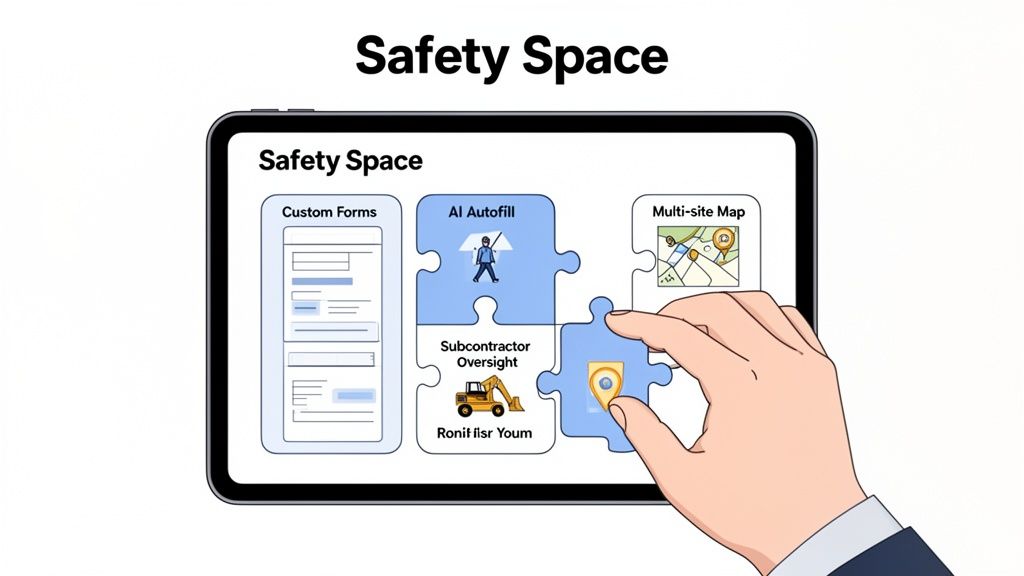
One of the biggest frustrations with off-the-shelf software is its inflexibility. Your business has unique processes and specific compliance forms you’ve spent years refining; you can't just throw them out. This is where Safety Space is different. Our platform is fully customisable, meaning we adapt to your workflows, not the other way around.
You can create digital versions of your existing paper forms, build custom checklists, and design workflows that mirror how your teams already operate. This makes a huge difference in getting your crew on board, as the system feels familiar from day one.
Cutting Down the Endless Admin Grind
Managers and supervisors are often buried under a mountain of administrative tasks. Chasing up paperwork, filling out forms, and compiling reports eats up hours that should be spent on-site, managing safety and keeping projects moving.
Safety Space tackles this head-on with AI-powered form completion. This smart feature pre-fills repetitive information, suggests corrective actions based on inspection data, and generally speeds up the entire documentation process. For your field teams, it means less time tapping on a screen and more time focusing on the job. For you, it means accurate, consistent data without the manual grind.
The goal isn't just to digitise your paperwork; it's to make the entire process of collecting and managing information faster and more accurate, giving you back critical hours in your day.
Clear Oversight Across All Workers and Sites
Managing multiple sites and a revolving door of subcontractors is a massive headache. Without a central system, keeping a clear line of sight over compliance and progress is nearly impossible. Safety Space gives you a single command centre for your entire operation.
Our platform provides seamless multi-site and subcontractor oversight, so you get a real-time view of every project. You can easily manage subcontractor credentials, track their on-site activity, and check that they're meeting your safety standards. This gives you the control you need to protect your business and maintain high standards, no matter how complex things get.
Flexibility That Works For You
We know that business needs can change on a dime. That’s why Safety Space operates on a monthly, cancel-anytime subscription. We don't believe in locking you into long-term contracts. This gives you the freedom to adapt as your company grows or project requirements shift.
To make sure you get started on the right foot, we also offer a free demo and a comprehensive H&S consultation. This isn't just a sales pitch; it's a hands-on session where we help you set up the platform to solve your specific challenges. It’s the easiest way to see how Safety Space can be the all-in-one solution your field teams have been waiting for.
Still Have a Few Questions?
Thinking about bringing in new field workforce management software is a big move, and it's smart to have questions. We get it. Here are some of the most common ones we hear from businesses in construction and manufacturing, answered straight up.
How Does The Software Keep Up With Australian WHS Compliance?
This is the big one for any Australian business, and rightly so. Good software isn’t just a fancy digital tool; it’s built from the ground up with regulations like the Work Health and Safety (WHS) Act in mind. It’s designed to give you an unbreakable, time-stamped digital paper trail of all your safety activities.
Think of it this way: when one of your crew completes a mandatory pre-start checklist on a machine, their submission is logged the second they hit 'submit'. This proves the check was done, who did it, and the exact time it happened. You can build any compliance form you need right into the system, making sure you’re always collecting the right data to meet your legal duties.
In short, the system becomes your digital compliance archive. Forget digging through filing cabinets for an audit; you can pull up any record in seconds and prove your due diligence.
What Does a Typical Implementation Timeline Look Like?
This is where people often overestimate the disruption. For a small to medium-sized business in construction or manufacturing, you’re not looking at a months-long, painful overhaul. A practical rollout is usually done in just a few weeks.
A phased approach works best. It usually looks something like this:
- Week 1: We sit down with you for the initial setup, customising forms and workflows to match how you actually work.
- Week 2: We get a pilot program running with a small, trusted team or on a single site. This lets us iron out any wrinkles in a low-stakes environment.
- Weeks 3-4: Time for the wider rollout. We get all your key staff trained up with practical, hands-on sessions so they’re confident from day one.
The real key is to avoid a big, dramatic launch. By starting small and getting your team leaders on board first, you get a much smoother, more natural adoption across the whole company.
How Secure Is My Team's Data in the Cloud?
It’s your data, so you should be asking this. Reputable cloud platforms use multiple layers of protection to keep your sensitive project and worker information safe. It's less like a folder on a server and more like a digital bank vault.
Top-tier platforms use advanced encryption, which basically scrambles your data into unreadable code for anyone without the right key. They also run on world-class secure servers from providers like Amazon Web Services or Microsoft Azure, which have their own high-level security. Frankly, it’s often far more secure than an on-site server in your office, which is vulnerable to everything from theft to a burst water pipe.
Ready to see how a truly practical field workforce management software can finally solve your operational headaches and make compliance simple? Book a free demo with Safety Space. Let us show you how our customisable, all-in-one platform is built for businesses like yours. Get started with Safety Space today.
Ready to Transform Your Safety Management?
Discover how Safety Space can help you implement the strategies discussed in this article.
Explore Safety Space FeaturesRelated Topics
Safety Space Features
Explore all the AI-powered features that make Safety Space the complete workplace safety solution.
Articles & Resources
Explore our complete collection of workplace safety articles, tools, and resources.